

Sage Intacct Implementation
Our Methodology
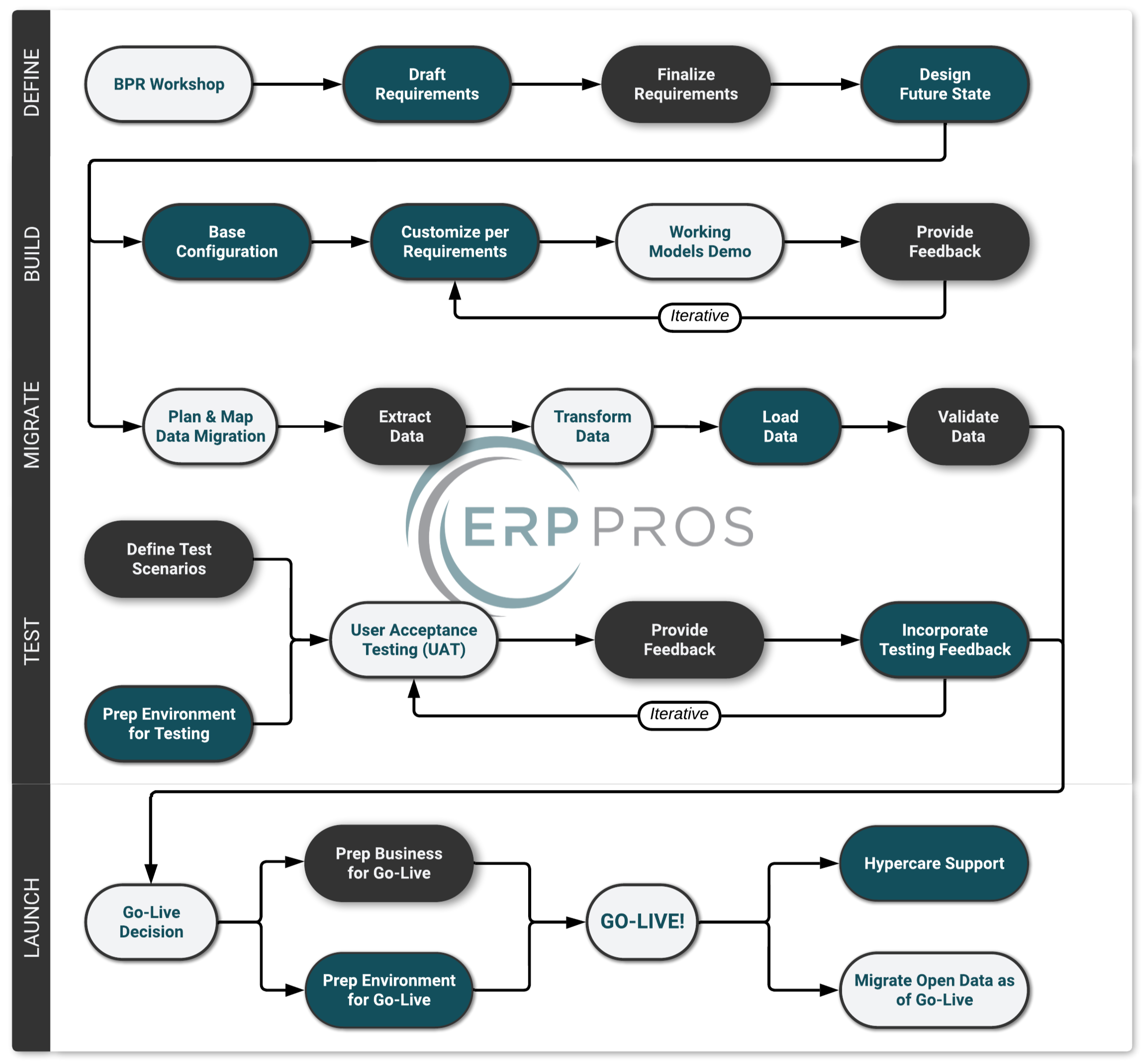
Every implementation we lead follows a structured, five-phase methodology: Define, Build, Migrate, Test, and Launch. The phases are sequential in concept but overlapping in practice — migration work, for example, spans nearly the entire project timeline. What stays constant is a commitment to transparency, collaboration, and a system that's built around how your business actually operates. Here's what that looks like.
Define Phase
IT ALL STARTS WITH A PLAN…
ERP implementations are notoriously tricky. To some extent, that’s just the nature of the beast when you’re dealing with making major changes to critical business processes while simultaneously learning the quirks of a new tool. But as with any new undertaking, there are tried-and-true ways to significantly mitigate these risks. The first, not surprisingly, is working from a solid plan.
We start with a template which we’ve perfected over years of repetition, but customize that based on the unique needs of every project. While there’s no need to re-invent the wheel every time, no two businesses are exactly the same so it follows that their needs, constraints, and preferences will vary. For this reason, we spend significant energy crafting a custom plan for each implementation that actually makes sense.
BPR Workshops
With some basic discovery under our belts and a high-level plan in place, it’s time to dig in and get our hands dirty. Ideally, we get the whole project team, key stakeholders, subject matter experts, and the office dog together for a few days in front of a whiteboard. We walk through each step of your current processes as a jumping off point for helping us to imagine what the new world might look like and begin to draft the processes and system requirements which support the realization of that future state.
REQUIREMENTS
Out of the BPR workshops comes a discrete list of system requirements. We draft these for you first, then collaborate to refine them until every detail specific to your organization is nailed down. This list, coupled with the data migration tasks, becomes the foundation of everything we're tracking towards go live.
FUTURE STATE PROCESSES
With a solid understanding of your current processes, pain points, and needs, we redesign what the future state looks like within Sage Intacct. These are documented as process flow diagrams — useful for framing future testing, serving as a quick reference for users after go live, and grounding discussions as requirements are finalized.
Build Phase
FROM BLUEPRINT TO REALITY
This is where the plan comes to life. Armed with your requirements, future state processes, and data migration roadmap, our team gets to work configuring Sage Intacct to match. We build out your chart of accounts, dimension structures, workflows, approval chains, security roles, reports, dashboards — everything defined in the previous phase, translated into a working system.
The Build phase is iterative by design. We don't disappear into a cave for three months and emerge with a finished product. Instead, we work in cycles — configuring a module, validating it against your requirements, adjusting based on what we learn, and moving on to the next. Your project team stays involved throughout, reviewing progress in regular check-ins so there are no surprises down the road.
For projects that include integrations with third-party systems — banks, payroll providers, CRMs, e-commerce platforms — this is also where we develop and test those connections. The goal by the end of Build is a system that's functionally complete and ready for your team to put through its paces.
Data Migration
YOUR DATA, YOUR RULES
The best accounting system in the world is worthless without the data you rely on. In the Migrate phase we work together to define the nitty gritty details of needs to come over from your legacy system and exactly how it will map into the new world. We consider this its own phase as it has distinctly unique characteristics but from a timeline perspective this actually spans the majority of the project and breaks down into three key types of data.
CORE DATA
Chart of Accounts, Legal Entities, Locations, Bank Accounts, Departments, Classes, Customers, Vendors, Employees, Projects, Tasks, Items, Contracts, and on.
Once upon a time we’d say Sage Intacct has 8 standard dimensions, or ways to break your COA down into multiple fields, but today it’s closer to 12 depending on your modules and by the time you’re reading this it could be 20+ (not to mention the ability to add custom dimensions).
HISTORIC DATA
Historic data is the financial transaction history from your legacy system — the records you need in Sage Intacct to run year-over-year comparisons, close-period reporting, and trend analysis without having to log back into the old system every time someone asks "what did last year look like?" We typically recommend bringing over 1–2 years of GL history, summarized by month, legal entity, GL account, and any other dimensions critical to your reporting. Enough to maintain continuity and context without dragging along every transaction from the dawn of time.
CUTOVER DATA
Sometimes referred to as “Open Data,” this refers to the set of transactions which are part of multi-step workflows initiated in your legacy system that have not been completed prior to go-live. Accounts Payable bills that have been entered but not yet paid, Customer Orders yet to be fulfilled, and Outstanding Checks for bank reconciliation purposes are a few examples.
Testing & Training Phase
TRUST BUT VERIFY
Before we hand you the keys, we make sure the car actually runs. The Test phase is where we validate that everything we've built and migrated holds up under real-world conditions — first with our team driving, then with yours.
WORKING MODELS
Sometimes called a Conference Room Pilot, a working model is a structured walkthrough of your new system while it's still being built — typically around the halfway mark. We sit down with your team and run through core business processes end-to-end in a partially configured environment. The goal isn't perfection; it's early feedback. Are the workflows intuitive? Did we miss a step? Does the approval routing actually reflect how your team operates day-to-day? We often run smaller versions of this throughout the project, but having a dedicated session specifically designed to surface gaps before formal UAT helps us course-correct while changes are still cheap and easy to make.
ITERATIVE UAT
User Acceptance Testing (UAT) is where the rubber meets the road. First, our team leads the way through key business processes in your new system, end-to-end. Think sales demo except no one is trying to convince you of how perfect things are; it’s actually quite the opposite. We turn your team loose to walk through the new system on their own with one primary goal: break it. Find the exceptions, the missed requirements, the use cases no one remembered to bring up.
Prior to this our team will have already performed extensive testing, but at the end of the day we’ll never know your business as well as you do and it would be naive assume any differently. We want the actual people who will be using the system day in and day out to try and do their actual work - the idea is to get as close to reality as possible while simultaneously benefiting from the safety of not working in a live environment and having hands-on support from our team as they do so.
Ideally these sessions are held on-site together for several days with the entire project team in a conference room working together.
END-USER TRAINING
By this point, your project team has been living and breathing the new system for months — but the rest of your organization hasn't. End-user training bridges that gap. We build role-based training sessions tailored to how each group will actually use Sage Intacct: AP clerks get hands-on with bill entry and payment runs, project managers walk through time and expense workflows, and controllers see the reporting and close process from start to finish. The emphasis is on practical, day-one readiness — not a feature tour, but the confidence to sit down on go-live morning and know exactly where to click.
Launch & Stabilize Phase
Deploy
Go-live doesn't just happen — it's orchestrated. The Deploy phase is a coordinated cutover effort that brings together every technical and organizational thread we've been pulling on throughout the project. On the technical side, we finalize system configuration, double-check integrations, confirm user roles and permissions, and run through a detailed go-live checklist to make sure nothing slips through the cracks. On the people side, we help you to manage stakeholder communications — notifying leadership, department heads, vendors, and end users about what's changing, when it's changing, and what to expect on day one. We coordinate timing across teams so that legacy system cutoffs, bank feed transitions, and open transaction handoffs all land cleanly. Think of it as mission control for your go-live.
HYPERCARE
The system is live — now what? Hypercare is the intensive, hands-on support window that follows go-live, typically spanning about six weeks through your first month-end close in the new system. Our team is on call and actively engaged as your users navigate real transactions for the first time: answering questions, troubleshooting edge cases, fine-tuning workflows, and resolving any issues that only surface once the system meets the full weight of daily operations. The goal is a clean first close — and the peace of mind that comes with knowing you're not doing it alone. By the end of hypercare, your team isn't just using Sage Intacct; they own it.